A clearer view
of your original.
Check availability for your ORI and explore the map list before downloading your MapPack.
Explore a map listBoost Pressure Targets 04Engine Torque 23Injection Timing 89
Your original, with the MapPack loaded.
Eight real maps. Different categories.
Move from table to 2D and 3D.
Recorded from WinOLS. Display modes and viewing angle change; original map values are unchanged.
WinOLS is a product of EVC electronic GmbH.
Upload your ORI and check for a MapPack match. Available to everyone, with or without an account.
File-specific map definitions for your original ECU file.
Check your ORI. Preview the maps. Continue in WinOLS or Tuning Editor.
A real Audi A6 example, from identification to 316 maps.
Click through the stages. Nothing is uploaded.
WinOLS MapPacks, map-name previews and browser editing.
One place to manage your calibration projects.
Check availability for your ORI and explore the map list before downloading your MapPack.
Explore a map listOpen supported projects in your browser. Explore table, 2D and 3D views, and compare ORI and MOD.
Inside the editorTrack requests, access verified versions, manage your credits and keep support conversations together.
See the workspaceStart a request with your original ECU file and vehicle details.
The portal identifies available file information and checks MapPack availability.
Browse categories and map names for free, before choosing to download.
Download the WinOLS MapPack or open supported maps in Tuning Editor.
Open a category and explore its map names.
No addresses. No offsets. Just a clear preview
of what’s available.
Coverage and map counts depend on the exact original file.
These names come from the verified example MapPack.
Explore supported ECU calibration maps in the online Tuning Editor.
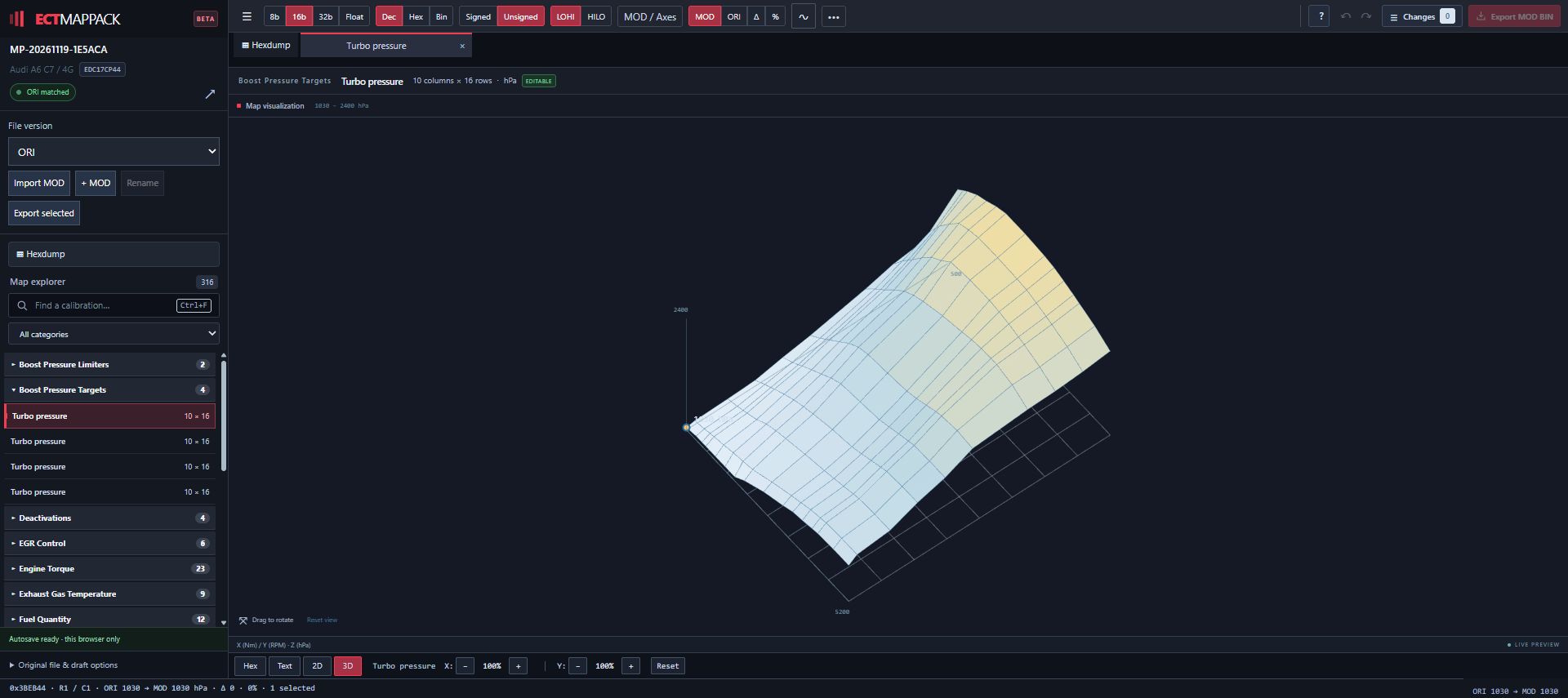
Editing and MOD export are available for supported maps.
Feature availability depends on the project.
CREDITS THAT FIT YOUR WORKFLOW
Choose your credits. Use them when you need a MapPack.
€50.00 EUR
5 MapPacks
Free re-downloads
View purchase options in your account
€80.00 EUR
10 MapPacks
Free re-downloads
View purchase options in your account
€120.00 EUR
20 MapPacks
Free re-downloads
View purchase options in your account
€250.00 EUR
50 MapPacks
Free re-downloads
View purchase options in your account
Preview names, categories and dimensions for free when your result is ready. Credit is charged when you first download the completed MapPack.
REAL FILES. REAL MAP DEFINITIONS.
Map addresses, dimensions and available axis information in one structured file.
Examples shown. Available maps depend on the uploaded file. Read the real Audi, Toyota and Golf project examples.
GOOD TO KNOW
Upload the original, unmodified ECU file. Complete the vehicle, ECU, software and reading-tool details requested by the portal. Read the ORI file preparation and upload guide.
Yes. When your result is ready, open Preview map list inside your request to browse map names, categories and dimensions without using a credit. If there are multiple versions, you can view each list and see newly added maps where a comparison is available. Try the preview example. Full map data is included in the unlocked download.
Availability depends on the exact file and the available map definitions. A request does not guarantee that a MapPack can be generated.
No. A MapPack organizes map definitions for calibration work. It does not modify your original ECU file. Learn what a WinOLS MapPack contains.
Open the matching original file in WinOLS and use the CSV/JSON map-list import/update feature. Check that your WinOLS version supports JSON map-list import. Read the WinOLS 5 JSON import guide.
Timing varies by file and availability. Some previously processed exact files can be delivered from the existing library; other requests require processing. Follow your request status in the workspace.
BUILD YOUR WINOLS WORKFLOW
Understand your definitions, check the preview and import the result into the matching project. For browser editing, follow the Tuning Editor user guide.
Learn how JSON map names, categories, dimensions and available axes relate to your original ECU file.
MapPacks explainedFollow the WinOLS 5 map-list import workflow and check the definitions after import.
Read the import guideExplore the 316-map Audi A6 EDC17CP44 project and original Toyota Supra MG1CS201 and Golf GTI Simos19.6 screenshots.
Explore the examplesBEFORE YOUR NEXT PROJECT
Talk to us through the portal. We’ll help you with your request.
Already part of ECTMAPPACK? Log in to your workspace